
Want your brand to rank on Google? Then look at how some brands in very competitive niches, such as iGaming, handle their domains. One brand appears to use both fresh domains and aged domains in its website strategy. But here is the interesting part: it does not use aged domains only for websites. It also uses them for redirects.
In this guide we read a redirect map like that one, explain why a brand would build it, show how to set up an aged domain redirect yourself, and cover what to check so you don’t buy the wrong domain.
The short version: point a clean aged domain to your main site with a permanent 301 redirect, and some of its backlink value and history may help support your fresh domain over time.
Look at the map: how aged domains feed one main domain
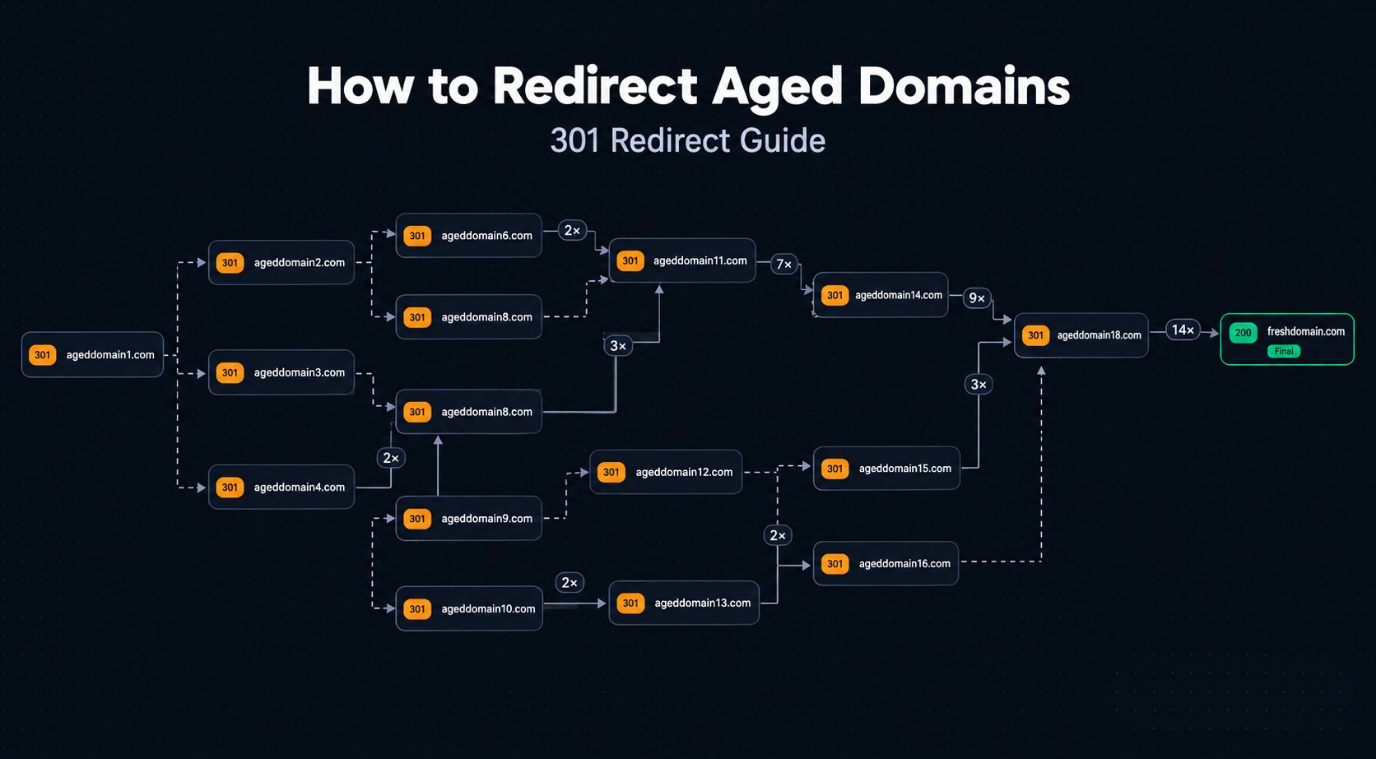
Picture a redirect map. On the left you see many domains. Some of them redirect to another domain, and that domain redirects to yet another one. But look at the end of the line: many of them lead to one main domain.
Every one of those jumps is a 301 redirect, the HTTP status code for “moved permanently”. It tells browsers and search engines that the old address has been replaced by a new one for good. Google explains how it treats permanent redirects in its documentation on redirects and Google Search.
Now read the map step by step. Aged Domain A redirects to Aged Domain B. B redirects to Aged Domain C. C redirects to the fresh domain. Other aged domains feed into the same chain, so you end up with many domains but only one main website at the end.
These domains are not random. An aged domain is a domain that has been registered for a long time, usually with some history behind it: past content, indexed pages and backlinks from other sites. So the real question is: why would a brand use them this way?
Why would a brand redirect aged domains?
Imagine you launch a new website on a fresh domain. It has no backlinks and no track record yet. Now imagine you find an older domain that already has links from other websites and a clean history. If you redirect that domain to your new site, three things can happen:
- Visitors who still use the old address, or follow old links, reach your new website.
- Some of the link value from the old domain’s backlinks can pass through the 301 redirect to your site.
- Over time, a strong and relevant backlink profile can support your new site’s visibility in Google.
This is why aged domains attract attention in SEO. They can come with backlinks, indexing history and a past that a brand-new domain simply does not have.
So is the brand in our redirect map trying to make its fresh domain stronger? That is the logical reading: many aged domains, one main website at the end. A redirect is not a shortcut, though. Google does not publish how much value passes, and relevance matters, so treat it as one piece of a bigger strategy.
How to redirect an aged domain step by step
The setup takes six steps. Google’s own advice for moving a site is in its guide to a site move with URL changes, and the same principles apply here.
Step 1: Choose the destination
Decide which page on your main site should receive the traffic. If the aged domain used to cover a specific topic, redirect it to the closest matching page or category, not automatically to the homepage.
Step 2: Vet the aged domain
Check its backlinks, history and indexing status before you rely on it. Our guide on how to audit an aged domain before you buy walks through the process, and the next section lists the key checks.
Step 3: Point the domain to a server you control
The old domain must resolve to a server (or a service such as a CDN) that can answer requests, even though it will not host any content. Update the DNS records or nameservers at your registrar, and install an SSL certificate so that https:// requests do not show a browser warning.
Step 4: Create the 301 redirect
You can do this at the registrar (look for “permanent” or “301” forwarding, not “temporary”), in a CDN rule, with a WordPress redirect plugin, or in the server configuration.
Apache (.htaccess):
RewriteEngine On
RewriteCond %{HTTP_HOST} ^(www\.)?old-domain\.com$ [NC]
RewriteRule ^(.*)$ https://www.yourbrand.com/$1 [R=301,L]
Nginx (inside the server block of the old domain):
server_name old-domain.com www.old-domain.com;
return 301 https://www.yourbrand.com$request_uri;
Step 5: Map old URLs to matching new pages
Backlinks usually point to specific pages, not just the homepage. If you know the old URL structure, redirect each important URL to the most relevant new page. Sending everything to the homepage wastes the topical signal and can be treated as a soft 404.
Step 6: Test and monitor
Check that the old domain returns a 301 status and lands on the right page in a single hop:
curl -I -L https://old-domain.com
Test the www and non-www versions and both http and https. Then keep an eye on your new site in Google Search Console, and renew the old domain every year. If the registration lapses, the redirect stops working and the link value is lost. Keep the redirect in place for as long as possible, and at least a year.
Check the backlinks, authority and history before you buy
Don’t judge a domain by its age alone. A domain can be 10 or 20 years old and still be worthless, or even harmful, for SEO. Before you buy, review its backlinks, authority scores and history:
| Check | What to look for | Red flag |
| Backlink quality | Links from real, relevant websites, from many different referring domains | Links from link farms, casino, adult or pharma sites, or thousands of links from a handful of domains |
| Authority scores | A healthy score in a third-party SEO tool, used as a rough guide | A high score with a thin or suspicious backlink profile |
| Domain history | Past content in the Wayback Machine that matches a real site or business | Past use as a spam site or a hacked site, or obvious network footprints such as shared hosting and heavy cross-linking. Previous PBN use needs extra scrutiny |
| Indexing status | The domain still has indexed pages or a visible past in Google | No trace in search results at all, which can mean it was deindexed |
| Topical relevance | The old site covered a topic close to your new site | A completely unrelated topic, or backlinks that mention the wrong topic |
| Anchor text | Natural mix of brand names, URLs and varied phrases | Mostly exact-match keywords or off-topic anchors |
Authority scores come from third-party tools, not from Google, so treat them as a guide and not as a verdict. A clean history and relevant links matter more than a big number. If the numbers look impressive but the history looks shaky, skip the domain. For more on spotting harmful links, read our guide to toxic backlinks and aged domains.
Redirect chain or direct 301: which setup should you use?
A redirect map like the one above can be built in two ways, and the choice changes how clean your setup is.
- Redirect chain. Domain A redirects to B, B to C, and C finally to the main site. Many domains can funnel into one destination this way, but every extra hop adds delay for visitors and crawlers, and one broken link in the chain breaks everything after it.
- Direct 301. Every aged domain redirects straight to the main site, or to the most relevant page on it, in a single hop. It is faster, easier to audit and easier to fix.
Image placement: insert the chain versus direct 301 comparison illustration here. Alt text: Diagram comparing a redirect chain with direct 301 redirects from aged domains to one main website. Caption: Direct 301 redirects are cleaner and faster than multi-hop redirect chains.
Google’s crawler can follow a limited number of hops, but there is no benefit in making it work harder. If you build or inherit a chain, keep it short and audit it from time to time, so that no old rule turns into a loop or a dead end.
Clean domains matter: risks to avoid
A good aged domain can be useful, but a bad one can do harm. Some domains carry spam links or a bad history, and you don’t want to buy one just because the numbers look big. Google’s spam policies also cover expired domain abuse and manipulative link practices, so stay on the safe side:
- Redirecting unrelated domains in bulk. An old brewery site pointing to a software review site sends confusing signals and looks manipulative. Choose domains that match your topic.
- Buying on numbers alone. A big authority score means little if the backlinks are spammy or the history is poor.
- Sending everything to the homepage. Map old URLs to matching pages whenever you can.
- Building long chains or loops. Keep every redirect to one hop and test after each change.
- Letting the old domain expire. When the registration lapses, the redirect and its value disappear. Turn on auto-renewal.
- Expecting instant results. Search engines need time to recrawl and process redirects, and no redirect guarantees a ranking.
- Ignoring your main site. A redirect supports a good website. It cannot make thin or low-quality content rank.
FAQ
Does a 301 redirect pass SEO value?
Generally yes: a 301 tells search engines the move is permanent, and link signals can be consolidated on the new address. How much value passes depends on the quality and relevance of the old domain’s backlinks, and there is no guarantee.
Can I redirect several aged domains to one website?
Yes. Many sites do. Redirect each domain directly to the main site, and make sure every domain is clean and related to your topic.
Should I use a 301 or a 302 redirect?
Use a 301 for a permanent move. A 302 signals a temporary change, so it is the wrong choice when the aged domain will point to your site for good.
How long does it take to see results?
It varies. Search engines have to recrawl the old URLs and process the redirect, which can take days or weeks, and ranking changes (if any) come later.
Is redirecting an aged domain safe?
It is safe when the domain is clean, relevant and redirected with a real purpose. It is risky when the domain has a spammy history or has nothing to do with your site.
What we can learn from the map
Three lessons stand out:
- Aged domains are not only for building websites. You can also use them for redirects.
- Don’t look only at the age of a domain. A domain can be 10 or 20 years old and still be a bad buy. Check the backlinks, the authority scores and the old website history.
- Clean domains matter. Spam links or a bad history can cancel the benefit, and relevance to your topic matters.
Seen this way, a redirect map is not magic. It is a simple idea done with good domains: clean, relevant and connected in as few hops as possible.
Now you know another way people use aged domains: not only to build websites, but as part of a redirect strategy. Looking for an aged domain for your own SEO project? Browse aged domains at Rexus Domain, filter by DA, PA, DR and niche, and open each domain’s details to check its referring domains, historical metrics and age before you buy. New to buying? Start with our step-by-step guide to buying aged or expired domains.