

A guy I know in the casino affiliate space bought an aged domain back in March. Decent metrics too DR 34, around 280 referring domains, ten years of history as a sports betting blog. Audit came back clean. No penalty flags, nothing weird in the Wayback snapshots. Basically the domain you’d want if someone handed you a checklist and said “find one of these.”
Three weeks after he launched on it? Nothing. Rankings just sat there. And the few pages that did get indexed were stuck way outside the top 50, for keywords the old domain used to actually rank for back in the day.
Turns out the dev had done the “easy” thing. Pulled every old URL into a spreadsheet, 301’d the whole pile straight to the homepage. All of it. Old review pages, category archives, even a handful of spam pages the previous owner left lying around that nobody cleaned up first.
That’s not really a redirect strategy though. That’s pointing a hose at the wrong wall and hoping for the best. Google noticed inside a month.
And honestly, this is the part most aged domain guides just skip. Buying clean gets you in the door. What you actually do with the dead weight sitting on that domain before launch is what decides whether you get the authority transfer you paid for, or whether you bought someone else’s mess with extra steps.
Why This Matters More on an Aged Domain Than a Fresh One
Fresh domain, you’re starting from nothing. No history, no orphaned pages, no decade-old backlink pointing at a URL that hasn’t existed since 2019. Blank slate.
Aged domains don’t give you that luxury. Ten years of activity can leave behind anywhere from a few hundred to tens of thousands of indexed URLs, depending on what the domain used to be. Even some random niche blog can leave 500+ pages still sitting in Google’s memory.
Here’s the part people forget. Google doesn’t wipe a domain’s history just because you bought it. The crawl scheduler, the coverage report, how the domain actually gets indexed all of it is still shaped by whatever existed there before you showed up. Ignore that and you’re not starting from the trust position you paid good money for. You’re starting from a confused one.
In iGaming it’s worse. Gambling content gets the YMYL treatment, so the bar for “does this domain make sense” is already higher than almost anywhere else. A domain full of broken internal links and unresolved 404s doesn’t read as established authority. It reads as neglected.
The “Just Redirect Everything to the Homepage” Move
This is the default for most devs, and honestly a lot of SEOs too. Pull the list, 301 it all to root, call it done. Feels efficient. It’s also one of the fastest ways to torch an aged domain’s authority without realizing you did it.
Two things go wrong.
You dilute the link equity instead of actually transferring it. Say there’s a URL “/best-live-dealer-bonuses-2022/” with backlinks from a few sports betting forums. That’s topical relevance right there. Redirect it to your generic homepage and you’ve snapped that match. Some equity still moves over. A real chunk just evaporates. We get into the actual mechanics in aged domain link equity decay if you want the deeper version short version is, equity transfer isn’t a flat 1-to-1, and dumping it on an irrelevant target speeds up the decay.
The bigger problem is the pattern itself. Hundreds of unrelated URLs all funneling into one destination looks like manipulation. That’s a textbook soft-404 setup, exactly the kind of structural noise modern quality systems are built to flag. Why hand your brand-new build a credibility problem before it’s even had a shot to earn trust on its own?
Most people get this wrong because they treat cleanup like a technical chore. It isn’t. Every redirect is either preserving value or quietly burning it.
Finding Every Dead URL First (Don’t Skip This)
Can’t sort what you haven’t found. Before any redirect goes live, you need a full inventory of every URL that domain has ever had, as far back as the records go. Four sources, used together.
Wayback Machine, CDX API. Skip the manual snapshot-clicking and pull the whole URL list programmatically instead. The CDX API spits out every archived URL for a domain in seconds, including stuff that got deindexed years ago and never got recrawled since. Same tool we walk through in how to use the Wayback Machine on an aged domain. This is your historical baseline.
Screaming Frog, crawling the live site. Full crawl, “Always Follow Redirects” turned on. Shows you what’s actually live right now: what’s already redirecting and where, what’s throwing a 404 or 410 today. Export the response code report. That’s your current-state map.
GSC, Coverage report. Already set up? If not, here’s the setup walkthrough. The “Not Found (404)” and “Crawled, not indexed” buckets show you exactly which dead URLs Google’s still wasting crawl budget trying to reach. Honestly, this is your priority list.
Ahrefs or Majestic, backlinks filtered by target URL. Most people skip this and it’s the one that matters most. Pull every backlink, group by which URL it’s pointing at. A dead page with zero referring domains? Don’t care. A dead page with 40 referring domains from relevant gambling and sports sites? That’s an asset, not garbage. Don’t throw it away on a blanket redirect. Not sure which tool to run this through? We broke it down in Ahrefs vs Majestic vs Semrush for aged domains.
Dump all four into one spreadsheet URL, status code, referring domains, top anchor text, what the page used to be about, your proposed action. That’s your working doc for everything that follows.
The 4-Bucket System
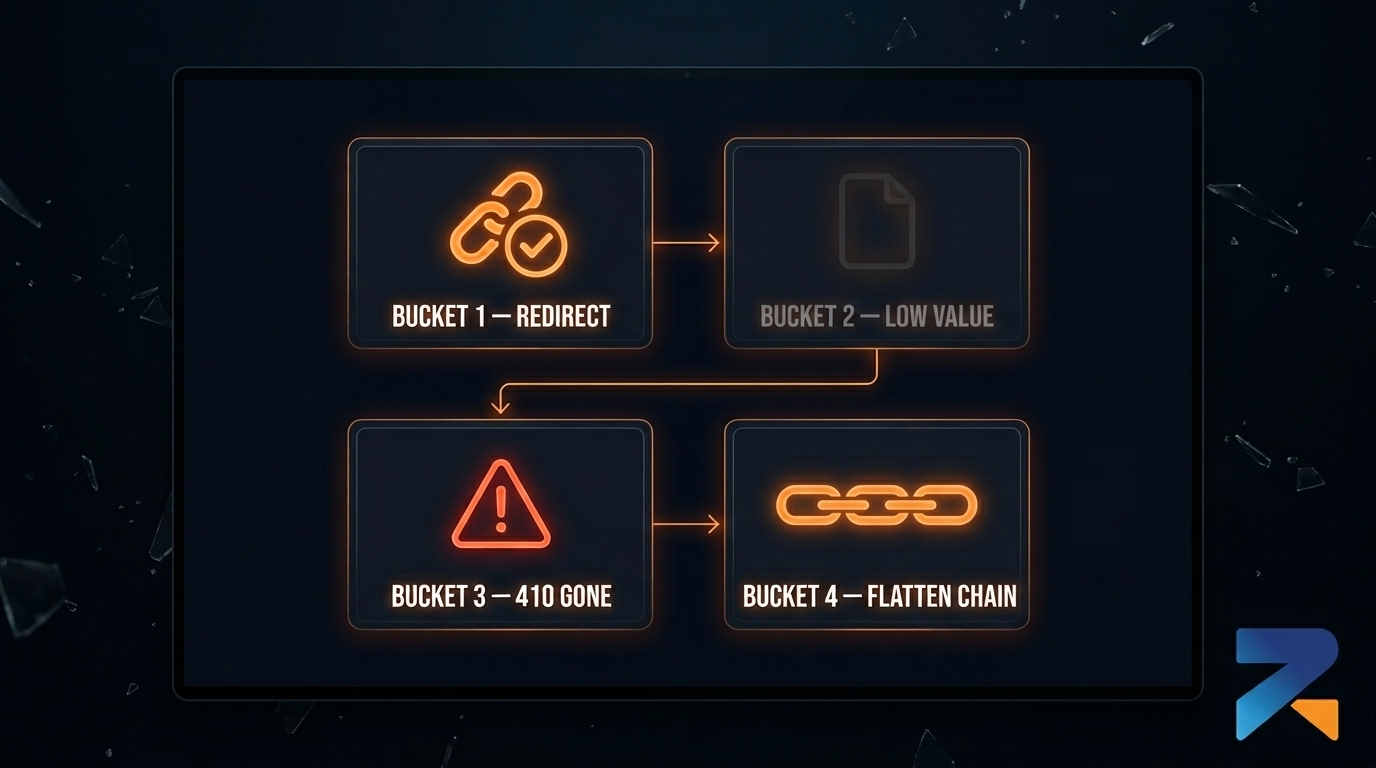
Once you’ve got the full list, every dead or orphaned URL falls into one of four piles. Sort everything first. Don’t jump ahead to setting redirects before this part’s done, order actually matters here.
Bucket 1, URLs with real backlinks attached. These get a 301. Never to the homepage by default though. Match each one to whatever’s most topically relevant on the new build. A URL that used to rank for “best crypto casino bonuses” goes to your crypto bonus page, not your homepage. Slower than a blanket redirect, sure. It’s also the only version that actually keeps the value those backlinks represent.
Bucket 2, indexed but basically worthless backlink-wise. Pages Google’s still got in the index, but with zero or near-zero referring domains. Low stakes. Redirect to a relevant category if one exists, or just let it 404. Don’t waste time mapping these one by one, that’s not where the value lives.
Bucket 3, junk left over from whoever owned it before. Thin spam, hacked pharma pages, link farm leftovers, anything that has no business being on a legit iGaming property. Do not redirect these. Use a 410 instead. It tells Google flat out the page is gone for good and isn’t coming back, drops out of the index faster than a regular 404, and doesn’t pass anything forward. If any of these are tangled up with toxic backlinks, this is also your cue to go back through the domain’s full link profile against our toxic backlink disavow guide.
Bucket 4, redirect chains already in place. Some URLs are already mid-chain from a previous owner. A to B to C, that kind of thing. Every hop bleeds a bit of signal and slows the crawl down. Flatten every chain you find one hop, straight from the original URL to wherever it’s actually supposed to land. For the technical setup itself, redirect types for aged domains covers how to implement each type properly at the server level.
The Actual Workflow, Step by Step
Here’s the order I’d run this in.
- Pull the full historical URL list off the Wayback Machine CDX API.
- Crawl the live domain in Screaming Frog, export current status codes.
- Cross-check both lists against GSC Coverage to flag dead URLs Google’s still actively crawling.
- Pull a backlink export, Ahrefs or Majestic, grouped by target URL and sorted by referring domain count.
- Merge it all into one spreadsheet, sort every URL into a bucket.
- Build the redirect map for Bucket 1. One relevant target per URL. No shortcuts.
- Set 410s on every Bucket 3 URL before touching anything else on the domain.
- Flatten every Bucket 4 chain down to one hop.
- Implement it server-side. Here’s the 301 setup walkthrough if you need the Apache, Nginx, or cPanel specifics.
- Push an updated XML sitemap with only your current, live URLs. Not the old structure.
- Re-crawl 48 hours later, confirm every redirect resolves in one hop with the right status code.
Do this before launch. Not after. Cleanup on a domain that’s already live and indexed is messier and slower than doing it before anyone’s watching.
What Actually Happened When He Fixed It
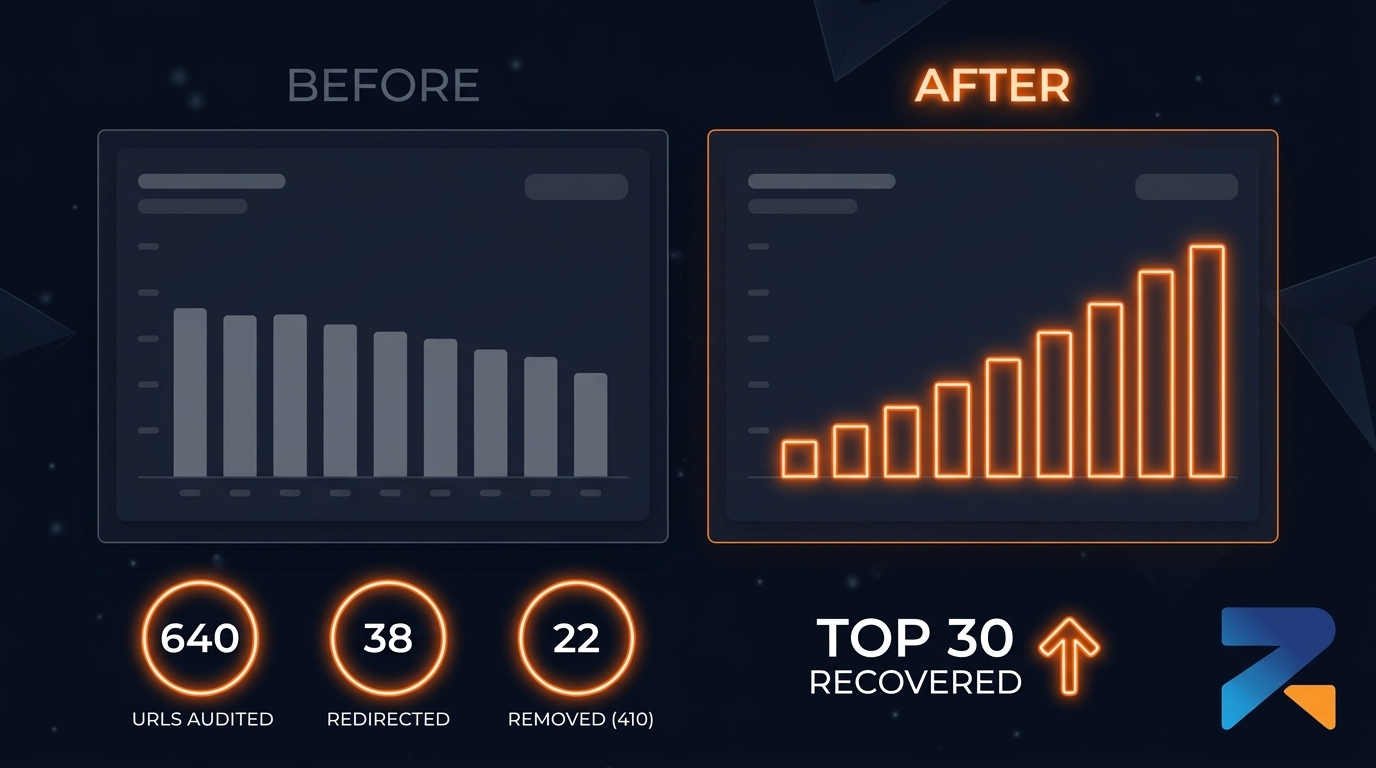
Back to the guy from the start of this. After three flat weeks he scrapped the homepage-redirect thing entirely and ran the full triage.
The Wayback pull surfaced 640 historical URLs, way more than he expected. The backlink export showed real referring domains on only 38 of them. The rest were either worthless or, in 22 cases, tangled up with spam turned out there was a cluster of hacked pharma content the previous owner never noticed or never bothered fixing. Those 22 got 410’d right away. The 38 with actual link value got individually mapped to relevant pages on the new build. Everything else either redirected to whatever category matched closest, or just got left to 404 on its own.
Five weeks later, Search Console’s “Crawled, not indexed” count had dropped by more than half. Three of his original target keywords were back in the top 30, keywords that hadn’t budged an inch under the old setup. Nothing else changed. Same content, same build, same hosting. The only thing different was how the dead URLs got handled.
Mistakes People Keep Making Here
Redirecting spam instead of just killing it. A 301 on a junk page doesn’t fix anything, it just relocates the problem to your new domain. Use a 410.
“Safe” homepage mapping. It’s not safe. It’s probably the single biggest reason aged domain authority underdelivers after launch.
Skipping the backlink cross-reference. Status codes alone tell you nothing about which dead URLs are worth saving. Without the backlink export you’re triaging blind.
Leaving chains in place. Worked fine for the last owner. Becomes your problem the second you take over. Flatten it before launch, not three months later when rankings stall and you’re trying to figure out why.
Doing all this after the fact. Way easier before launch. Once Google’s actively crawling your new structure, every fix takes longer to register and longer to correct.
The domains worth buying in the first place are the ones where this whole process actually pays off. Pre-audited inventory with documented history, like what’s on Rexusdomain, means fewer Bucket 3 surprises and a shorter list to sort through to begin with. You still have to do the triage work. It’s just a lot less painful when you’re not also untangling a decade of someone else’s mess.
Frequently Asked Questions
Should I redirect every dead URL on an aged domain?
No. Only URLs with genuine referring domain value should be redirected, and they should go to the most topically relevant page available, never blanket-redirected to the homepage. URLs with no backlink value can be left to 404 or sent to a relevant category page. Spam or junk pages from a previous owner should get a 410, not a redirect.
What’s the difference between a 404 and a 410 for cleanup?
A 404 tells Google a page wasn’t found but leaves room for it to be temporary, so Google may keep re-crawling it. A 410 says the page is permanently gone, which usually gets it dropped from the index faster and signals more clearly that you’re not passing value through it. For spam or junk left by a previous owner, 410 is the safer call.
How long does this actually take on an aged domain?
For a domain with a few hundred historical URLs, figure 4 to 8 hours of audit and mapping using Wayback Machine, Screaming Frog, GSC, and a backlink export. Bigger domains with thousands of historical URLs take longer, but the backlink filter usually narrows the real priority list down fast.
Can’t I just use a redirect plugin instead of doing this manually?
A plugin can help manage the redirect map once you’ve built it, but it won’t do the triage for you. Don’t rely on bulk “redirect all 404s” plugin features, they almost always default to homepage redirects or blind pattern matching, which is exactly the mistake this whole process is meant to avoid.
Does this still matter if I’m redirecting the entire aged domain to my money site?
Yes, arguably more. If you’re redirecting an entire aged domain to your money site, every legacy URL on that domain is part of what’s transferring authority. Cleaning up junk and flattening chains before you point the whole domain at your money site keeps spam signals from riding along with the good ones.
Related Guides
Sources & Further Reading
Frequently Asked Questions
How many 404 errors on an aged domain are too many?
A 10–20% 404 rate on an aged domain is common and manageable. The concern is not the number of 404s but whether broken URLs are losing link equity. Use Ahrefs or Screaming Frog to identify which 404 URLs have external backlinks pointing to them — those are the only ones that require 301 redirects to preserve authority.
Should I 301 redirect all 404 pages on an aged domain to preserve authority?
Only 301 redirect 404 URLs that have external backlinks pointing to them. Redirecting all 404 pages to your homepage creates a redirect chain that Google penalizes as ‘chain redirection spam.’ For 404 pages with no external backlinks, simply let them 404 — Google handles orphan 404s gracefully and removes them from the index over time.
Will fixing 404s on an aged domain improve its ranking potential for iGaming?
Fixing 404s on URLs with inbound backlinks directly recovers link equity that would otherwise be lost to dead endpoints. Each properly resolved redirect is a potential authority recovery. For aged domains with 100+ referring domains, auditing and redirecting top linked-to 404 pages can increase effective DR by 3–8 points.